







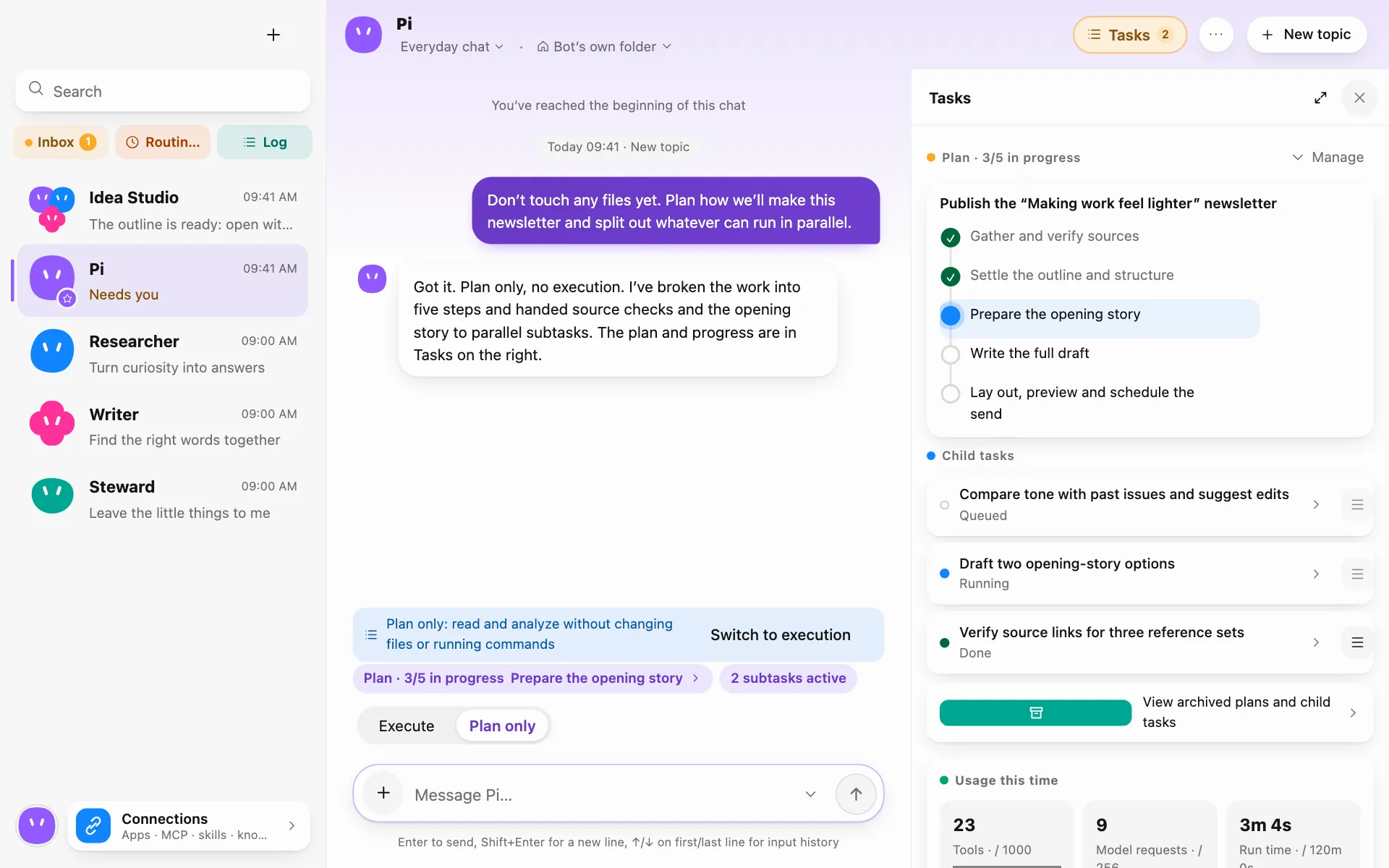
Teams by role
Research, writing, development, design… built-in roles and groups are ready to go. A group plans first, then splits and hands off the work, with progress in the side panel.
See how Bots divide work and hand off tasksInstall the desktop app and configure a model so Bots can share and hand off tasks in group chats.
Pair an Android phone or a Runner when you want to work from another device.
macOSWindowsLinuxAndroidAvailable now
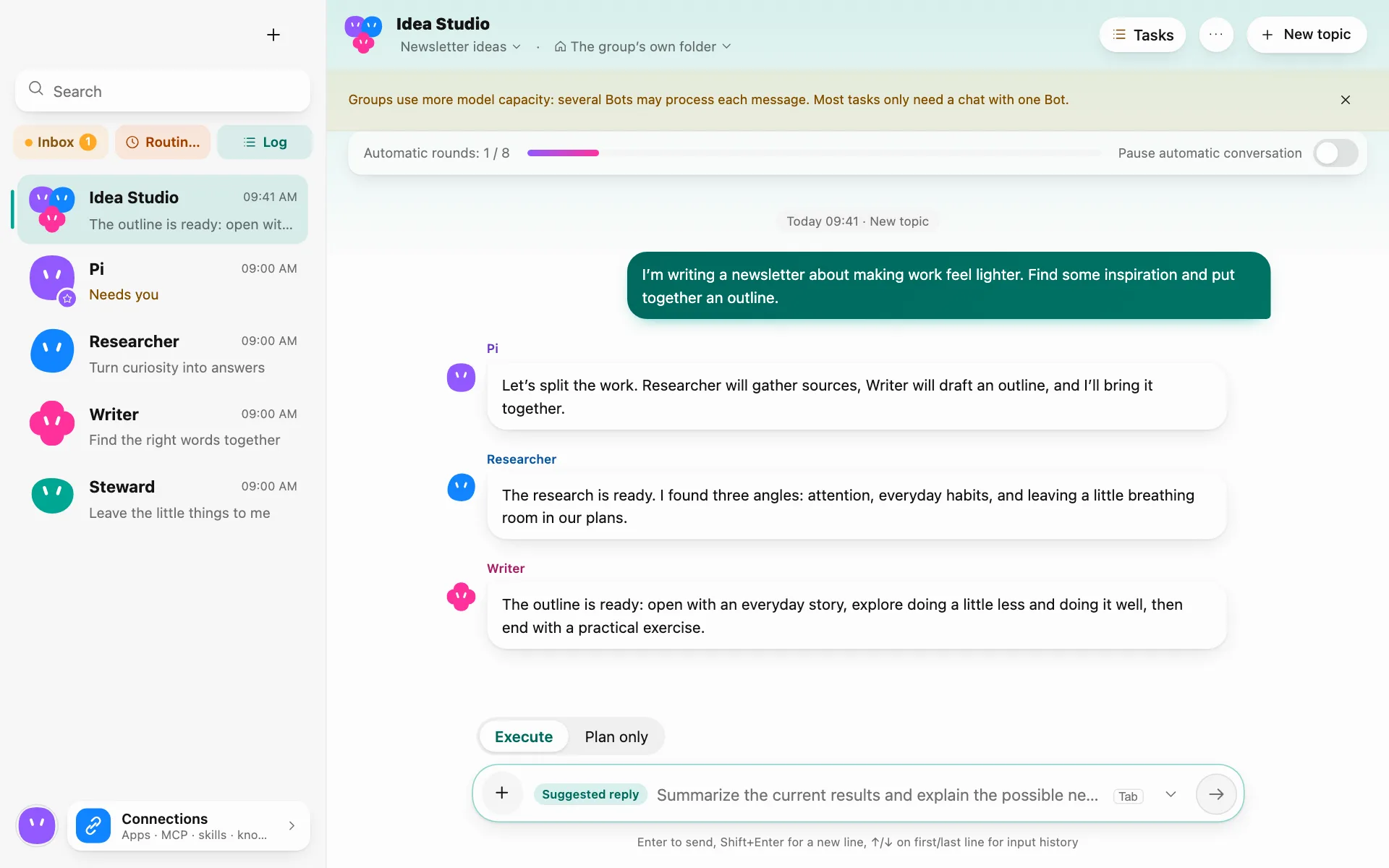
A real screen recording: groups move on their own, files reach you, every step can be checked, and your phone follows along.
The desktop app works on its own. Pair an Android phone to start tasks or handle approvals on the go. Connect a runner when your project is on another machine.
Create Bots, assign tasks, manage permissions, and review file changes and activity.
After pairing, start tasks, check progress, handle approvals, and preview results.
Run commands on the machine that hosts your project, then review the output and list of changes.
2 / 4Let a Bot work with photos on your phone
1 / 4Organize local files on your computer
3 / 4Run commands on another computer
4 / 4Computer away: the phone uses the model and directs the runner itself
How the data moves · four scenarios
Say “turn yesterday’s receipt photos into an expense sheet” on your phone. Your computer reads the photos only if the Photos switch on the phone is on, and removes the location first; the sheet is written on your computer, and the phone gets a notice and a preview. The photos do go to the model provider you chose to be read: that is where data leaves your devices.
Ask a Bot on your computer to summarize the PDFs in a folder. It reads only within that Bot’s folder permissions and sends the model the text it needs, not the whole folder. Writes are checked first, and every change can be reverted.
The project lives on another Windows computer, and you ask a Bot from your phone to run the tests. Each command is checked on your computer, then sent to your phone for you to confirm; Windows commands aren’t sandboxed, so every one is confirmed. The runner returns output, the exit code and a list of changes, not the folder.
When your computer is off, offline or has quit Pi Bot, the phone calls the model directly with the settings synced from the computer, so you can keep chatting with a Bot, and it can direct a paired runner itself. The runner accepts only a grant your computer signed in advance, valid for 24 hours, and checks again against its own copy of the policy; every command and file write is confirmed on the phone, and YOLO and “remember” don’t apply here. Once the computer is back, the conversations, commands and records sync back to it.
Direct connections firstEnd-to-end encryptedThe relay can’t read contentApprovals and commands auditedChanges can be revertedContent goes only to your chosen model and services you allow
See how Bots plan together, work with files, create deliverables, and run routines. The screenshots below show the app with sample data.
Research, writing, development, design… built-in roles and groups are ready to go. A group plans first, then splits and hands off the work, with progress in the side panel.
See how Bots divide work and hand off tasks
Each Bot has its own browser to look things up and sign in with saved accounts, and it learns a task after you show it once. Passwords and tokens reach the model only as stand-in handles, never as raw values.

Read and write Word, Excel and PowerPoint files and preview them in the side panel. Every change can be reviewed and reverted.

Your local calendar and contacts, Notion or Obsidian as knowledge sources, or MCP servers and skills brought over from other AI tools on this computer. It asks before writing to other apps.

Start on a schedule or when a folder changes. Missed runs and anything that needs your decision land in your inbox.

It reads the screen, clicks, and opens apps and files. Touch the mouse or keyboard and it pauses; a global shortcut stops it anytime, and apps such as password managers and terminals are always off-limits.

Bots remember what matters, kept separately for you, for each Bot, each group and each project. You can see everything they remember, and edit or delete it.
Choose which files and tools your Bots can access, set which actions need approval, and review the results in the activity log.
Conversations, memories and activity records are stored on your computer. The app has no telemetry or analytics; when you use a cloud model, the relevant content goes to the provider you chose.
Files, commands and computer use each have their own setting, and it asks when needed. On macOS and Linux commands run in a sandbox; on Windows they are not isolated, so every command is confirmed.
Set up command approvals and Bot permissionsYOLO applies to the current conversation only, and automatic approvals are still recorded; what you explicitly deny stays denied. Changes can be reverted.

Loading statistics…
Counts website download-button clicks and excludes retries by download tools. The total includes historical request counts and refreshes every 5 seconds while this page is visible.
View platform breakdown ↗Pi Bot is available. Choose your platform.
Release history: update path and what changed in each version →
Use your own keys with cloud providers such as OpenAI, Anthropic, Gemini and DeepSeek, or a local model through Ollama.
Set up an Ollama local modelStart with built-in roles and groups, then adjust their responsibilities and models.
Share an idea, hand off a task or set a routine, and grant permissions as needed.
The brain lives here: Bots, records and keys stay on your computer
Requires macOS 13 Ventura or later · Windows 10 / 11 · 64-bit Linux
The Intel and Apple silicon builds of Pi Bot v0.0.2 have not been notarized by Apple. On first launch, macOS may warn that Apple could not verify Pi Bot is free of malware.
If you downloaded the installer from the official Pi Bot website and choose to proceed, try opening the app first. Then go to System Settings → Privacy & Security, find the Pi Bot notice, and click Open Anyway.
Apple Support instructionsStart tasks, approve, see results
Does the work on another computer: runs commands, edits projects
“Tested” means this version was installed and run through on that platform.
Yes. The download and installation page lists the current release and installers for each platform.
Pi Bot’s brain runs on your computer, and your conversations, memories and activity records are stored there too. What leaves your devices is the request content sent to the model provider you chose, plus whatever a Bot exchanges with websites it opens and apps you connected. With a local model such as Ollama, model requests stay on your computer as well. Your computer, phone and runners are end-to-end encrypted with each other; when traffic goes through the relay, it only forwards ciphertext.
Pair them in Settings › Remote on your computer: the phone scans a code, and a runner takes a one-time pairing code. Devices connect directly over your local network first, and you can allow hole punching; if no direct path works, traffic goes through the relay, end-to-end encrypted. Phone data such as photos and SMS codes each has its own switch, and you decide what to turn on. On Windows and macOS the runner is a tray app; on Linux it is a command line that can run in the background with --daemon.
Yes. Once you allow a Bot to reply offline on your computer, its model settings and key sync to the phone. While the computer is unreachable, the phone calls the model directly so you can chat with that Bot, and it can direct a paired runner, with every command confirmed on the phone. When the computer reconnects, the conversations and records sync back to it.
No. The app has no telemetry or analytics and never reports crashes automatically. When you want to report a problem, you decide what to submit or export, and it never includes chats, files or keys. Model keys are kept in your system’s secure storage and are never shown in the app. The servers keep daily totals for website download clicks, app update checks, and connections to the official relay. These totals contain no IP addresses or personal identifiers.
Configure the model service you choose: your own API key for cloud providers such as OpenAI, Anthropic, Gemini and DeepSeek, or a local model through Ollama. Pricing, account eligibility and terms are set by the provider. This website does not collect your model keys.
Yes. Configure permissions, handle approval requests and review activity records. Take over the Bot browser and hand it back when ready. During computer use, touching the mouse or keyboard pauses the Bot, and a global shortcut stops it. Availability depends on your platform and system permissions.
No. YOLO automatically allows actions that would ask for approval in the current conversation, but explicit denials and other hard limits still apply. It starts off in new topics and does not affect routines. Turning it off restores prompts without leaving permanent grants. Automatic approvals are recorded. On Windows, every command still needs your confirmation.
The desktop app runs on macOS, Windows and Linux, the phone app is currently for Android, and runners work on Windows, macOS and Linux. Some capabilities vary by platform: on macOS and Linux commands run in a sandbox, while on Windows they are not isolated and each one is confirmed; computer use also depends on system permissions and the desktop environment.